Storage Tier Guide
The document classification feature controls the import and export of files based on the security classification assigned to the storage. This document provides guidance on how to configure the administrator settings. Please refer to the "Document Classification Guide (User)" for user screen operations.
The security grade and label values use the values managed by the Security365 management center, and the features below will only be exposed and operate if the security grade function is activated in the management center.
1. Storage Security Level Designation
When registering a new secure storage, specify the security grade and label of the storage.
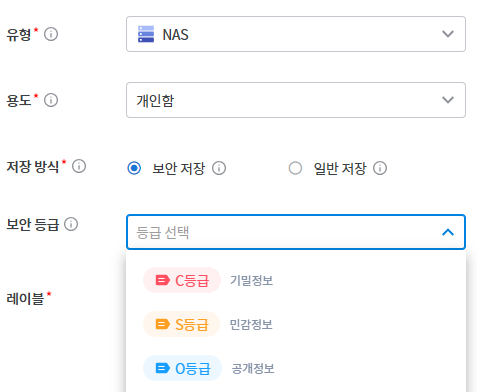
- In the storage registration screen, select "Security Level," and then select "Label."
[Select Grade]
[Label Selection]
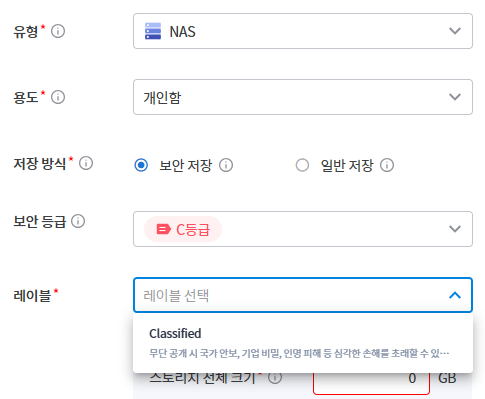
- If a grade is selected, the label is required.
- Storage that will not use a grade is selected as "Unspecified." Unspecified storage is excluded from grade control.
- The specified grade-label can be checked in the storage details screen.
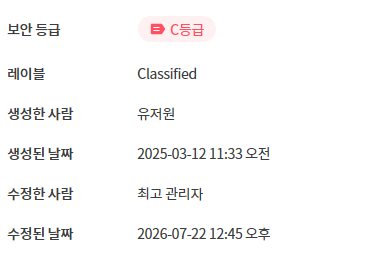
Note - Documents with a higher (more sensitive) classification than the specified classification cannot be imported into classified storage.
2. Unclassified File Control Settings
Company Settings - In the "File Control by Storage Grade" under the settings, you can configure the handling method for files that are not assigned a security grade (unclassified). There are two configuration items, and you can choose either allow or block for each. The default is block.
| Settings | When set to allow | When blocking |
|---|---|---|
| Upload Unclassified File | Files without a grade can also be uploaded to grade storage. When uploaded, the same security grade as the storage is automatically assigned. | Only files with a designated grade can be uploaded. Files without a grade are blocked. |
| Download Unclassified File | Download (Export) of Files Without a Grade | Blocking the download of files without a grade |
Basic Application Features (Always Operates Regardless of This Setting):
- The import-export of documents with designated grades is automatically controlled by grade comparison (downward blocking). The above setting applies only to "files without grades."
- If upload-download is completely disabled, the corresponding unspecified settings will also be disabled.
Caution - Unsupported Extensions: Files in formats that cannot have a security level assigned are treated the same as "Unclassified Files" and follow the settings for "Unclassified File Upload-Download" mentioned above. If set to allowed, they pass without classification.